

In the last few posts I’ve been talking about how AI is changing software development. But today I want to share something much more practical.
This image below summarizes what makes Claude Code so powerful — not just as an AI assistant, but as a real development workflow tool.
If you’re a backend engineer, full-stack developer, or technical lead, this is probably one of the most useful things you can start using today.
The Claude Code Workflow Cheatsheet
The image below is basically a complete developer workflow in one place.
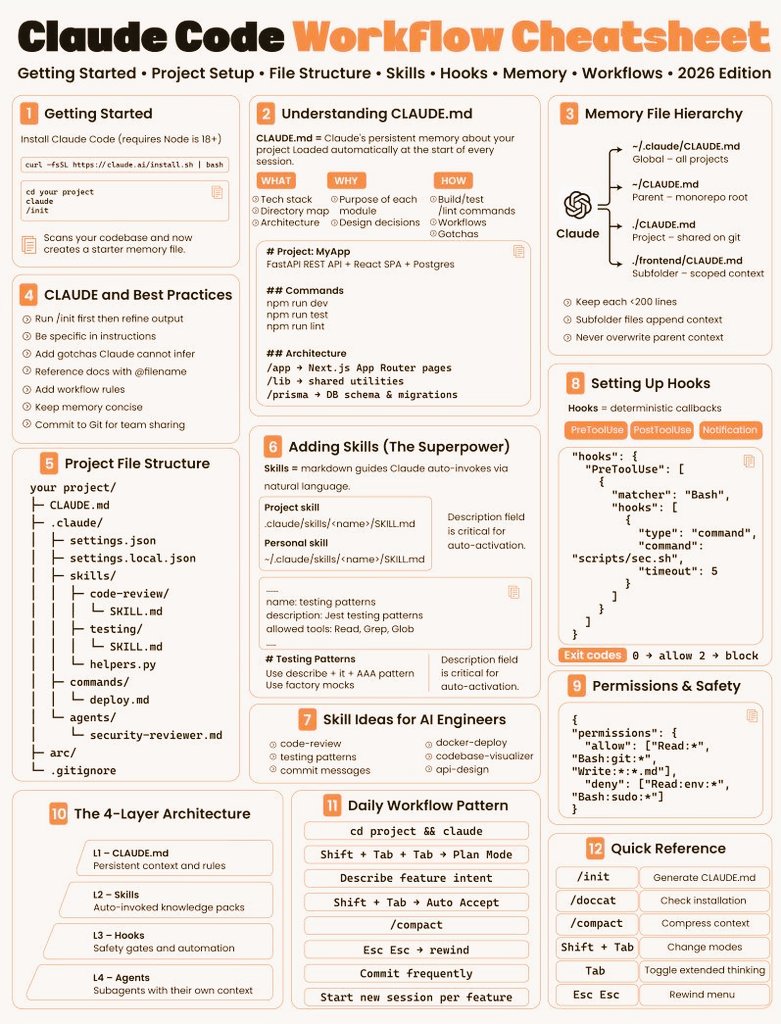
Instead of using AI only for small tasks (like generating a function or fixing a bug), Claude Code is designed to understand your entire project and work like a real engineering assistant.
What makes it powerful isn’t just the AI model — it’s the workflow around it.
1) It Starts With Understanding Your Project
One of the most important concepts in the cheatsheet is CLAUDE.md.
This file works as a persistent memory for your project. Instead of explaining your stack every time, you define things once:
- Tech stack
- Architecture
- Commands (build, test, lint, etc.)
- Coding rules
- Important design decisions
This means Claude doesn’t behave like a generic AI anymore. It behaves like a developer who already knows your codebase.
2) Real Project Structure, Not Just Prompts
Another thing the image shows very clearly is that Claude Code is designed around a real folder structure, not random prompts.
For example:
CLAUDE.md→ project knowledgeskills/→ reusable AI capabilitiescommands/→ repeatable workflowsagents/→ specialized assistants (like security reviewer or code reviewer)
This changes the way you use AI completely. Instead of writing long prompts every day, you build a system that works for you automatically.
3) Skills Are the Real Superpower
One of the most interesting parts of the cheatsheet is the section called “Adding Skills (The Superpower)”.
Skills allow you to teach Claude how to do things in a consistent way:
Examples of useful skills for developers:
- Code review
- Writing unit tests
- Refactoring legacy code
- Generating API endpoints
- Writing commit messages
- Improving performance
Instead of repeating the same instructions again and again, you define the logic once — and Claude applies it every time.
That’s where it stops being just an AI assistant and becomes a real productivity multiplier.
4) Hooks, Permissions, and Safety
Another reason this workflow is so powerful is that it’s not only about generating code.
It also includes:
- Hooks (automations before and after commands)
- Permissions (what Claude can or cannot do)
- Deterministic workflows
- Controlled execution
This is extremely important for real development teams, especially when working with:
- Production systems
- Fintech platforms
- Microservices
- Legacy codebases
This is something that clearly shows the direction that Anthropic is pushing: AI that integrates directly into real engineering workflows.
5) The 4-Layer Architecture (Why It Scales So Well)
The cheatsheet also explains a very important concept: the 4-layer architecture.
- Layer 1 – CLAUDE.md → Project memory
- Layer 2 – Skills → Reusable knowledge
- Layer 3 – Hooks → Automation
- Layer 4 – Agents → Specialized assistants
This structure makes Claude Code much more powerful than using AI in a chat window.
It allows you to scale your productivity as the project grows — instead of starting from zero every time.
6) What This Means for Developers
From a practical point of view, this changes how we work:
Instead of using AI to:
- Generate random snippets
- Fix small bugs
- Write small functions
We can start using AI to:
- Understand entire codebases
- Refactor large services
- Improve architecture
- Write better documentation
- Automate repetitive engineering work
And honestly, that’s where the real impact of AI in software development starts.
Final Thoughts
This cheatsheet is a great example of something important:
AI is no longer just a tool to generate code — it’s becoming part of the development workflow itself.
If you’re a developer and you’re not exploring tools like Claude Code yet, now is probably the right time to start.
Because the difference between using AI occasionally and using it as part of your daily workflow is huge.