

Most developers approach AI tools like chatbots.
That’s the mistake.
Tools like Claude Code aren’t just “ask-and-reply” interfaces—they’re programmable environments. Once you stop chatting and start operating them like systems, your productivity jumps dramatically.
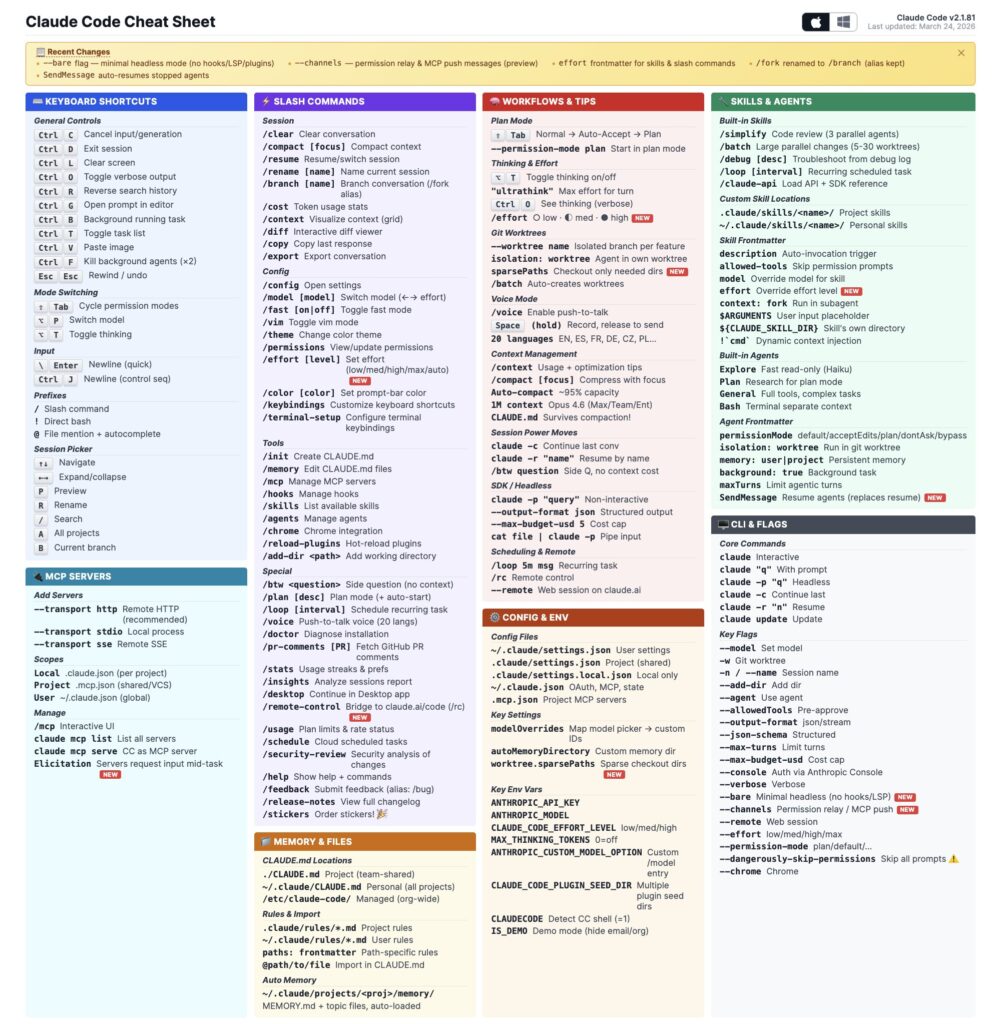
This cheat sheet image captures a huge surface area, but the reality is simple:
👉 You only need a small set of commands to unlock most of the value.
Let’s break down the 16 commands that matter, and more importantly—how to think about them as a system.
🧠 The Mental Shift: From Chatbot → System
Beginners:
- Ask → Wait → Copy → Repeat
Power users:
- Plan → Execute → Monitor → Optimize
Claude Code is designed for the second approach.
⚙️ The Core 16 Commands (That Actually Matter)
🏁 1. Session & Setup
/init
Creates CLAUDE.md, your project memory layer.
Think of it as:
- Persistent context
- Team knowledge
- Coding conventions
👉 If you’re not using this, you’re starting from zero every time.
/clear
Resets the session.
Use it when:
- Switching tasks
- Context is polluted
- Responses start degrading
🧭 2. Thinking Before Coding (Critical)
/plan
Forces Claude to think before acting.
This is one of the highest ROI commands.
Use it for:
- Feature design
- Refactors
- Architecture decisions
👉 Senior engineers don’t code first. They model first.
"ultra think"
Maximizes reasoning depth.
Use it when:
- Problems are complex
- You need trade-offs, not just answers
🧠 3. Context Management (The Hidden Bottleneck)
/context
Shows what’s consuming tokens.
Why it matters:
- Context = memory = performance
- Overflow = worse answers
/compact
Compresses context mid-session.
Use it when:
- Conversations get long
- You want to keep momentum without resetting
/rewind
Undo mistakes in reasoning or execution.
👉 Think of it as Git for your AI session.
🔀 4. Flow Control & Exploration
/btw
Ask side questions without breaking flow.
Example:
- You’re implementing caching
- You ask: “btw what’s the tradeoff with Redis vs in-memory?”
Shift + Tab
Switch modes instantly.
This is about speed of interaction, not capability.
🤖 5. Multi-Agent Power
/agents
Runs multiple agents in parallel.
Use it for:
- Generating alternatives
- Comparing implementations
- Reviewing code from different perspectives
/simplify
Spawns 3 agents to review your code.
Think:
- Code review
- Refactoring suggestions
- Complexity reduction
👉 This is like having a mini team on demand.
🌐 6. Automation & Execution
/chrome
Controls a browser:
- Click
- Fill forms
- Navigate
Use cases:
- Testing flows
- Scraping structured data
- Automating repetitive tasks
/loop
Runs prompts repeatedly.
Perfect for:
- Monitoring systems
- Periodic checks
- Background workflows
🔐 7. Permissions & Autonomy
/permissions
Pre-approve safe operations.
This removes friction.
--dangerously-skip-permissions
Full auto mode.
⚠️ Use carefully:
- No interruptions
- No confirmations
- Maximum speed, minimum guardrails
👉 This is where Claude shifts from assistant → autonomous agent.
🧩 8. Model Control
/model
Switch between models (Opus / Sonnet / Haiku).
Use strategically:
- Opus → deep thinking
- Sonnet → balanced
- Haiku → fast + cheap
🔥 Putting It Together: A Real Workflow
Here’s what a power-user flow looks like:
/init→ load project memory/plan→ define approach"ultra think"→ deepen reasoning/agents→ explore multiple implementations/model→ switch to faster model for execution/compact→ optimize context/loop→ automate follow-ups--dangerously-skip-permissions→ run at full speed
👉 This is not chatting. This is orchestration.
🚫 Why Most Developers Struggle
Because they do this:
“Write me a function…”
Instead of this:
“Plan → Compare → Execute → Validate → Optimize”
Claude Code isn’t underperforming.
It’s being underused.
💡 Final Takeaway
You don’t need to memorize the entire cheat sheet.
You need to master:
- Planning (
/plan) - Context (
/context,/compact) - Control (
/agents,/loop) - Autonomy (
/permissions)
Everything else is leverage.
🚀 TL;DR
- Most people use Claude Code like a chatbot
- Power users run it like a system
- These 16 commands unlock ~80% of the value
- The real advantage is not commands—it’s workflow
Save this. You’ll need it. ♻️